Snap and Grid
Snap
Snap locks your cursor to grid points, making it easy to align objects precisely.
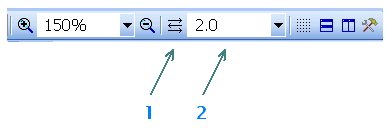
You can adjust the snap value for the current document on the main toolbar
The automatic snap button
How to Turn Off Snap
Hold the Shift key while moving objects to temporarily override snap. To snap an existing object to the grid, right-click it and select Snap to Grid.
Grid
Switch the main grid (1 cm spacing) with View - Switch main grid or press m.
The command cycles through the three grid types and off: grid with lines → grid with crosses → grid with dots → no grid.
You can also display a secondary grid that matches the current snap setting using View - Show/hide snap grid.
