Symbol library
The symbol library is installed in the "Public Documents/ProfiCAD Library" folder.
Since this is a critical part of your work, it's a good idea to move it to a directory that's backed up regularly. You can change the location in program settings (F12 - Paths).
The library is organized in three levels. Directories appear in list
⚠️ Don't place symbol files (.ppd and .picd) directly at levels
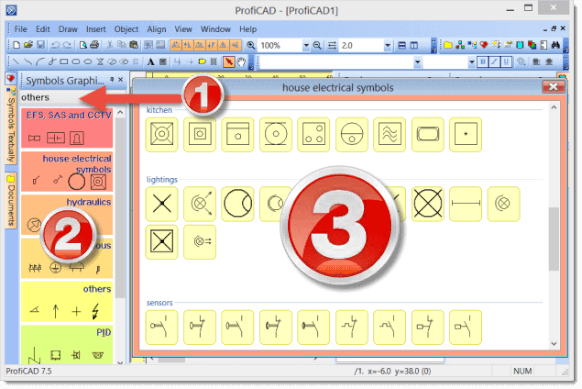
Symbols are organized as PPD files in groups (directories). Group names must not contain restricted characters \ / : * ? " < > | and must not start with the _ character.
To reorganize groups, use any file manager (Windows Explorer, Total Commander, etc.).
How to create a group
Create a new directory in the library.
How to rename a group
Rename the directory in the library.
How to delete a group
Delete the directory from the library.
Special directories
The library contains several directories starting with "_" that serve special purposes:
_TB: Stores title blocks (.ptb files)
_LIN: Stores line definitions (.lin files)
_CONF: Stores additional information, such as default symbol attributes
Three types of symbols in ProfiCAD
- Library symbols - loaded from PPD files. You can edit them in the Symbol Editor.
- Integrated circuits (IC) - loaded from PICD files. Also editable in the Symbol Editor.
- Built-in symbols - gates and transformers. Only some parameters (number of outlets, coils, etc.) can be changed.
Standards used for the symbol library
- Most symbols: EN 60617
- Some U.S. symbols: IEEE Std 315-1975 and ANSI Y 20.0-1975
- Process plant flow diagrams: EN ISO 10628
- IEC 61082: Preparation of documents used in electrotechnology
How to change the symbol library language
Simply changing the program language does not change the symbol library language. Symbols are stored as separate files and their names differ depending on the language version of the library.
If you want to change the symbol library language, uninstall the program and install the desired language version. Links to individual language versions can be found in the website footer.
Can multiple users share a symbol library?
Yes. In a company environment, create a shared folder on a server and map it as a network drive (e.g. Z:) on each employee's computer.
If you place the symbol library in this shared folder, everyone on the team can access and share symbols and drawings collaboratively.
