List of Cables
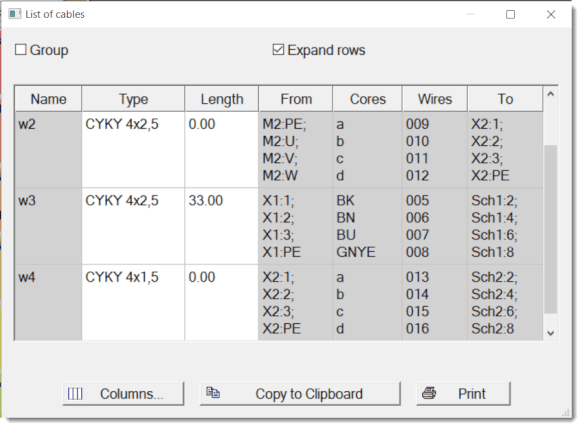
Generate a cable list via Outputs - List of cables.
Each row shows:
- cable name
- cable type
- cable length
- attached components (in the format symbol:connection point)
- cores
- wires
- where it leads (To)
The Group option displays the total cable length by cable type.
The Expand rows option puts each cable core on its own line.
How to sum cable lengths
Using connections
This method is suitable for floor plans where connections (cables) are drawn along their actual route.
- The program automatically detects the length of the connection on the drawing.
- If a scale is set for the page, the program automatically converts the length to real units.
- Summary data can be found in the List of wires.
Using cable symbols
This method can be used in both single-line and multi-line diagrams. The cable symbol serves as a representative of a specific cable.
- After inserting the symbol (or later via right-click), you enter the estimated length in the dialog. The program cannot determine the length automatically in this mode, so manual entry is required.
- In addition to the length, you also define the cable name and type.
- The total sum of lengths by cable type can be found in the List of cables.
Note:
All wires must have a unique name or number for the cable list to work correctly.
💡 Pro tip: The "Group" function is invaluable when ordering material – at a glance you see how many meters of each cable type you need.
