Symbol properties
Each symbol has a set of properties that affect its behavior in the drawing.
To edit them, open the symbol in the Symbol Editor, press F12, and select the Symbol tab.
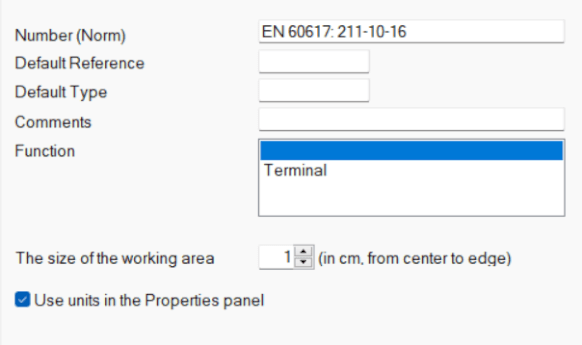
Properties
Number — identifies the symbol according to a standard, in the format standard:number
(e.g.EN 60617: 04-01-01)Default reference — identifier of the symbol type
(e.g.Rfor resistor,Cfor capacitor,Tfor transistor)Default type — electrical properties (e.g. resistance in Ω, capacitance in pF, transistor type)
This value is used as the initial value in the drawing and can be changed at any time.Comment — optional description of the symbol
Function — defines the behavior of the symbol in the program
⚠️ Change carefully — incorrect settings may affect functionality
Automatic numbering
If a symbol has a default reference, it is automatically numbered when inserted into the drawing.
For example:
R→R1,R2,R3, …C→C1,C2,C3, …
The reference defines the prefix, the number is added automatically.
If no reference is defined, only numbers are used:
1,2,3, …
Default values (reference and type)
To avoid setting the reference and type for each symbol individually, use:
Tools → Library Configuration
In the dialog:
- Open the Symbols tab
- Select a symbol group (left panel)
- Set the default reference and type (right panel)
⚠️ After making changes, run:
View → Reread symbols
Default visibility
If a symbol has a default reference and type defined, both values are automatically visible after inserting the symbol into the drawing.
💡 Tip:
Spend a few minutes setting default references and types in the library.
Once configured, every inserted symbol will already contain correct values — this saves a lot of time in larger projects.
